 DISKDROP FOR MAC
Find the gigabytes your dev tools left behind.
Old conda environments. Xcode data for devices you no longer own. node_modules in projects you finished last year. Models you tried once. DiskDrop finds them, shows the size of each, and moves what you choose to the Trash.
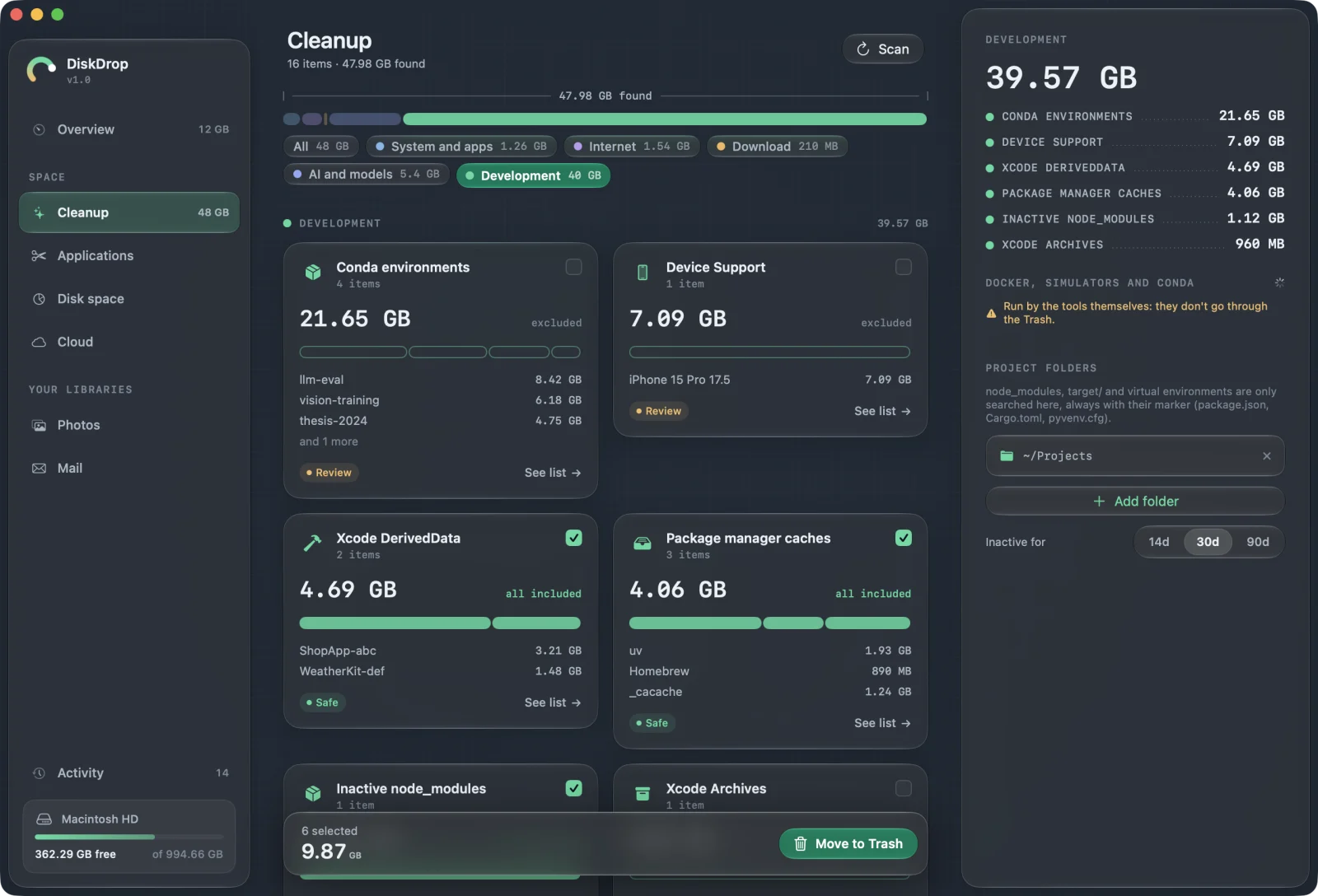
I built DiskDrop for my own machine. As a developer and AI researcher, this is what it found in the development category alone: 35.6 GB, including 22.7 GB in 20 conda environments, 7.1 GB of device support files and 4.1 GB of DerivedData.
— Marco Pilloni, developer of DiskDrop
What it finds
| TOOL | WHAT DISKDROP SHOWS |
|---|---|
| Conda | Every environment, with size, Python version and last package change. Unused packages via conda clean. |
| Xcode | DerivedData, Archives, Device Support, unavailable simulators, simulator reset. |
| Docker | Dangling images, build cache, unused anonymous volumes. |
| JavaScript | Inactive node_modules, npm, Yarn, pnpm and Bun caches. |
| Python | Inactive virtual environments, pip and uv caches. |
| Rust, Swift and more | Cargo target/ and registry, SwiftPM, CocoaPods, Gradle, Composer, Homebrew downloads. |
| AI models | Hugging Face, LM Studio, PyTorch, Keras, Whisper and Kaggle downloads. |
Built not to break your setup
- Your repositories are off-limits. Git repositories and
.gitfolders are excluded by rule. - Project folders are your choice. It only looks for build artifacts in the folders you pick, and checks their markers:
package.json,Cargo.toml,pyvenv.cfg. - Environments are never preselected. You decide, and the base conda install is never touched. Each one shows the command to export it first.
- The Trash comes first. Files can be restored. Docker and simulator actions are run by the tools themselves, so they aren't in the Trash: DiskDrop asks you to confirm first.
- No telemetry, no account, no background daemon.
FAQ
Will removing a conda environment break a project?+
It removes that environment. Export it first with conda env export -n NAME > NAME.yml, and recreate it when you need it.
Does it scan my whole disk for projects?+
No, only the folders you choose. It starts with common ones like ~/Projects and ~/Developer.
How is this different from a disk map like DaisyDisk?+
A map shows what's big. DiskDrop also knows what regenerates, what's safe and which tool it belongs to. It includes a disk map too.
Can I check what it does on the network?+
Yes, use Little Snitch or LuLu. It connects only for your license and updates, and when you open the app updates tab.
See what you'd get back.
DiskDrop is a Mac app that finds the space you don't need and moves what you choose to the Trash. Scanning is free; cleaning is a one-time license, with no subscription: €14.99 with code LAUNCH at checkout for a limited time, instead of €29.